I have one new trick to tell you today...
Imagine you have a Sharepoint list with a Date field that is only showing a date value and not the Time. If you create a Custom Display Form in Sharepoint Designer, you will see something incredible.
- Date field shows Time value
- Date field shows less 1 hour, which might lead to show one less day in date value
Just like this:
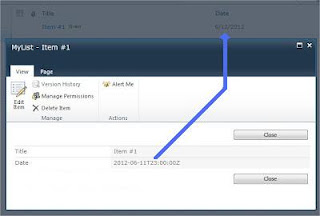 Check how I got the Date format...
1. Open your custom form in Sharepoint Designer and select the date value.
 2. Click the Formule button and write the following Formule:
ddwrt:FormatDate(string(@Date), 1033, 1)
Don't forget to use the string function!! Otherwise it will give you an error in XPath
1033 is the locale code, check other locale codes here List of Locale Codes
1 is the date format, the possible values are 1, 4, 5, 7,12, 13 or 15, each represent a different date format, pick the one that suites you better.
At least save your form and you will see a splendid result.
Enjoy my little trick...
dinsdag 27 november 2012
How to give a Date field the correct format in a custom DispForm


LCID Dec values for the XSLT FormatDate function
Use the LCID Dec values for the FormatDate function.
ddwrt:FormatDate(string(@Date), 1033, 1)
Language - Country/Region LCID Hex LCID Dec Afrikaans - South Africa 0436 1078 Albanian - Albania 041c 1052 Alsatian 0484 1156 Amharic - Ethiopia 045e 1118 Arabic - Saudi Arabia 0401 1025 Arabic - Algeria 1401 5121 Arabic - Bahrain 3c01 15361 Arabic - Egypt 0c01 3073 Arabic - Iraq 0801 2049 Arabic - Jordan 2c01 11265 Arabic - Kuwait 3401 13313 Arabic - Lebanon 3001 12289 Arabic - Libya 1001 4097 Arabic - Morocco 1801 6145 Arabic - Oman 2001 8193 Arabic - Qatar 4001 16385 Arabic - Syria 2801 10241 Arabic - Tunisia 1c01 7169 Arabic - U.A.E. 3801 14337 Arabic - Yemen 2401 9217 Armenian - Armenia 042b 1067 Assamese 044d 1101 Azeri (Cyrillic) 082c 2092 Azeri (Latin) 042c 1068 Bashkir 046d 1133 Basque 042d 1069 Belarusian 0423 1059 Bengali (India) 0445 1093 Bengali (Bangladesh) 0845 2117 Bosnian (Bosnia/Herzegovina) 141A 5146 Breton 047e 1150 Bulgarian 0402 1026 Burmese 0455 1109 Catalan 0403 1027 Cherokee - United States 045c 1116 Chinese - People's Republic of China 0804 2052 Chinese - Singapore 1004 4100 Chinese - Taiwan 0404 1028 Chinese - Hong Kong SAR 0c04 3076 Chinese - Macao SAR 1404 5124 Corsican 0483 1155 Croatian 041a 1050 Croatian (Bosnia/Herzegovina) 101a 4122 Czech 0405 1029 Danish 0406 1030 Dari 048c 1164 Divehi 0465 1125 Dutch - Netherlands 0413 1043 Dutch - Belgium 0813 2067 Edo 0466 1126 English - United States 0409 1033 English - United Kingdom 0809 2057 English - Australia 0c09 3081 English - Belize 2809 10249 English - Canada 1009 4105 English - Caribbean 2409 9225 English - Hong Kong SAR 3c09 15369 English - India 4009 16393 English - Indonesia 3809 14345 English - Ireland 1809 6153 English - Jamaica 2009 8201 English - Malaysia 4409 17417 English - New Zealand 1409 5129 English - Philippines 3409 13321 English - Singapore 4809 18441 English - South Africa 1c09 7177 English - Trinidad 2c09 11273 English - Zimbabwe 3009 12297 Estonian 0425 1061 Faroese 0438 1080 Farsi 0429 1065 Filipino 0464 1124 Finnish 040b 1035 French - France 040c 1036 French - Belgium 080c 2060 French - Cameroon 2c0c 11276 French - Canada 0c0c 3084 French - Democratic Rep. of Congo 240c 9228 French - Cote d'Ivoire 300c 12300 French - Haiti 3c0c 15372 French - Luxembourg 140c 5132 French - Mali 340c 13324 French - Monaco 180c 6156 French - Morocco 380c 14348 French - North Africa e40c 58380 French - Reunion 200c 8204 French - Senegal 280c 10252 French - Switzerland 100c 4108 French - West Indies 1c0c 7180 Frisian - Netherlands 0462 1122 Fulfulde - Nigeria 0467 1127 FYRO Macedonian 042f 1071 Galician 0456 1110 Georgian 0437 1079 German - Germany 0407 1031 German - Austria 0c07 3079 German - Liechtenstein 1407 5127 German - Luxembourg 1007 4103 German - Switzerland 0807 2055 Greek 0408 1032 Greenlandic 046f 1135 Guarani - Paraguay 0474 1140 Gujarati 0447 1095 Hausa - Nigeria 0468 1128 Hawaiian - United States 0475 1141 Hebrew 040d 1037 Hindi 0439 1081 Hungarian 040e 1038 Ibibio - Nigeria 0469 1129 Icelandic 040f 1039 Igbo - Nigeria 0470 1136 Indonesian 0421 1057 Inuktitut 045d 1117 Irish 083c 2108 Italian - Italy 0410 1040 Italian - Switzerland 0810 2064 Japanese 0411 1041 K'iche 0486 1158 Kannada 044b 1099 Kanuri - Nigeria 0471 1137 Kashmiri 0860 2144 Kashmiri (Arabic) 0460 1120 Kazakh 043f 1087 Khmer 0453 1107 Kinyarwanda 0487 1159 Konkani 0457 1111 Korean 0412 1042 Kyrgyz (Cyrillic) 0440 1088 Lao 0454 1108 Latin 0476 1142 Latvian 0426 1062 Lithuanian 0427 1063 Luxembourgish 046e 1134 Malay - Malaysia 043e 1086 Malay - Brunei Darussalam 083e 2110 Malayalam 044c 1100 Maltese 043a 1082 Manipuri 0458 1112 Maori - New Zealand 0481 1153 Mapudungun 0471 1146 Marathi 044e 1102 Mohawk 047c 1148 Mongolian (Cyrillic) 0450 1104 Mongolian (Mongolian) 0850 2128 Nepali 0461 1121 Nepali - India 0861 2145 Norwegian (Bokmål) 0414 1044 Norwegian (Nynorsk) 0814 2068 Occitan 0482 1154 Oriya 0448 1096 Oromo 0472 1138 Papiamentu 0479 1145 Pashto 0463 1123 Polish 0415 1045 Portuguese - Brazil 0416 1046 Portuguese - Portugal 0816 2070 Punjabi 0446 1094 Punjabi (Pakistan) 0846 2118 Quecha - Bolivia 046B 1131 Quecha - Ecuador 086B 2155 Quecha - Peru 0C6B 3179 Rhaeto-Romanic 0417 1047 Romanian 0418 1048 Romanian - Moldava 0818 2072 Russian 0419 1049 Russian - Moldava 0819 2073 Sami (Lappish) 043b 1083 Sanskrit 044f 1103 Scottish Gaelic 043c 1084 Sepedi 046c 1132 Serbian (Cyrillic) 0c1a 3098 Serbian (Latin) 081a 2074 Sindhi - India 0459 1113 Sindhi - Pakistan 0859 2137 Sinhalese - Sri Lanka 045b 1115 Slovak 041b 1051 Slovenian 0424 1060 Somali 0477 1143 Sorbian 042e 1070 Spanish - Spain (Modern Sort) 0c0a 3082 Spanish - Spain (Traditional Sort) 040a 1034 Spanish - Argentina 2c0a 11274 Spanish - Bolivia 400a 16394 Spanish - Chile 340a 13322 Spanish - Colombia 240a 9226 Spanish - Costa Rica 140a 5130 Spanish - Dominican Republic 1c0a 7178 Spanish - Ecuador 300a 12298 Spanish - El Salvador 440a 17418 Spanish - Guatemala 100a 4106 Spanish - Honduras 480a 18442 Spanish - Latin America 580a 22538 Spanish - Mexico 080a 2058 Spanish - Nicaragua 4c0a 19466 Spanish - Panama 180a 6154 Spanish - Paraguay 3c0a 15370 Spanish - Peru 280a 10250 Spanish - Puerto Rico 500a 20490 Spanish - United States 540a 21514 Spanish - Uruguay 380a 14346 Spanish - Venezuela 200a 8202 Sutu 0430 1072 Swahili 0441 1089 Swedish 041d 1053 Swedish - Finland 081d 2077 Syriac 045a 1114 Tajik 0428 1064 Tamazight (Arabic) 045f 1119 Tamazight (Latin) 085f 2143 Tamil 0449 1097 Tatar 0444 1092 Telugu 044a 1098 Thai 041e 1054 Tibetan - Bhutan 0851 2129 Tibetan - People's Republic of China 0451 1105 Tigrigna - Eritrea 0873 2163 Tigrigna - Ethiopia 0473 1139 Tsonga 0431 1073 Tswana 0432 1074 Turkish 041f 1055 Turkmen 0442 1090 Uighur - China 0480 1152 Ukrainian 0422 1058 Urdu 0420 1056 Urdu - India 0820 2080 Uzbek (Cyrillic) 0843 2115 Uzbek (Latin) 0443 1091 Venda 0433 1075 Vietnamese 042a 1066 Welsh 0452 1106 Wolof 0488 1160 Xhosa 0434 1076 Yakut 0485 1157 Yi 0478 1144 Yiddish 043d 1085 Yoruba 046a 1130 Zulu 0435 1077 HID (Human Interface Device) 04ff 1279
List copied from http://msdn.microsoft.com/en-us/goglobal/bb964664
dinsdag 6 november 2012
Horizontal alignment of Choise Fields
This week I found a way to change the alignment of a Choice Field.
Nice to know if you have list of questions where somebody has to choose
between for example three answers.

You only have to make a custom New/Edit page in Sharepoint Designer
and add the next line
<xsl:comment>FieldName="Display Name"</xsl:comment>
just before the sharepoint Formfield definition <SharePoint:FormField …

Change the "Display Name" by the display name of your Sharepoint Field.

Add a Content Editor webpart to your page and
put the next Jquery script in this webpart.
<script>
$( document ).ready( function() {
// columnName = Field Display Name
// perRow = how many choices you want to see in one row.
            $().SPServices.SPArrangeChoices({
                        columnName : "Display Name",
                        perRow: 3
                        });
});
</script>
donderdag 11 oktober 2012
Check if Sharepoint Richt Text Editor Field is empty or not (works in IE, Firefox and Chrome)
Found out this week that the code for checking the content of a multi-line rich text field was
not working for other than IE-browsers.
So after some debugging in Chrome I found a solution that works in Chrome and in Firefox.
I hope that it's also working in other browsers... but I don't have them to my position at work.
Have fun with my new code...
 firefox/chrome bugfix...
    var scomments = "";
    if ($.browser.msie)
 {
  // IE browser, check on language needed because Sharepoint and IE Translates the IFrame name in different languages.
  if (_spPageContextInfo.currentLanguage == 1036)
  {
            var systemDescriptionRTE = $("textarea[title='Comments']").closest("span").find("iframe[Title='Éditeur de texte enrichi']").contents().find("body");
            scomments = $(systemDescriptionRTE).text();
        }
        else
        {
            if (_spPageContextInfo.currentLanguage == 1043)
   {
                var systemDescriptionRTE = $("textarea[title='Comments']").closest("span").find("iframe[Title='RTF-editor']").contents().find("body");
                scomments = $(systemDescriptionRTE).text();
            }
            else
            {
                var systemDescriptionRTE = $("textarea[title='Comments']").closest("span").find("iframe[Title='Rich Text Editor']").contents().find("body");
                scomments = $(systemDescriptionRTE).text();
            }
        }
 }
 else
 {
 // if other browser
        var systemDescriptionRTETextArea = $("textarea[Title='Comments']");
        scomments = $(systemDescriptionRTETextArea).val();
 }
Now you can check with the 'scomments' variable is it is empty or containing some values.
donderdag 13 september 2012
Hide a webpart or Columns of a ListView webpart.
Found some interesting JQuery for hiding a SharePoint Webpart,
or some columns of a ListviewWebpart.
This can be usefull if you have some columns that are language depentend.
So of that moment you can hide for example a column with dutch text
or an other column with other information.
Or if you want that someone has less columns than another user
in the same view and you don't want to duplicate the views.

My example below will hide a complete webpart and the first three columns
of a ListView webpart.
Attention, if you have more than one listView webpart on your page,
all the same columns will be hidden.

If you know how I can determ to hide the columns of a specific webpart...
I'm interested in the code.
$( document ).ready( function() {
 // hide new webpart
 $(MSOZoneCell_WebPartWPQ5).hide();
 // hide column 1, 2 and 3
    $(".ms-listviewtable,.ms-emptyView").find("td:nth-child(1),th:nth-child(1)").hide();
    $(".ms-listviewtable,.ms-emptyView").find("td:nth-child(2),th:nth-child(2)").hide();
 $(".ms-listviewtable,.ms-emptyView").find("td:nth-child(3),th:nth-child(3)").hide();
});
dinsdag 4 september 2012
Change ContentType and Metadata of your Documents uploaded in a Sharepoint Library
This part for updating a sharepoint contentType for a uploaded Document in a SharePoint Library.
So Once you have uploaded a File into a SharePoint Library, you needs it's ID for changing the
metadata or contentType of a Document.
So first of all call my function below for getting the ID.
//Call to the function to get the ID
string sID = sGetID(sSiteUrl, sSiteList, sFileName);
private string sGetID(string sURL, string sListName, string sFileName)
{
string sID = "";
SPListsService.Lists list = new SPListsService.Lists();
list.Url = sSiteUrl + "/_vti_bin/lists.asmx";
// I have a common Boolean field for determing if I use the current logged on user or to use a Technical User.
// attention !!!! The user must have access to your Sharepoint environment.
if (bDefaultLogon)
list.Credentials = System.Net.CredentialCache.DefaultCredentials;
else
{
list.PreAuthenticate = true;
list.Credentials = new System.Net.NetworkCredential(sTechnicalUser, sTechnicalPw, sTechnicalDomain);
}
try
{
string rowLimit = "99999";
XmlDocument xmlDoc = new System.Xml.XmlDocument();
XmlNode listQuery = xmlDoc.CreateNode(XmlNodeType.Element, "Query", "");
listQuery.InnerXml = "" + sFileName + "
My Code below will change the ContentType of your Document and also some extra Metadata.
Now it is posible that you would not want to change the ContentType,
 so if not, put the call in comment.
The reason why you need the change of your ContentType and
the rest of your Metadata in a different XML update block
is because by changing the ContentType, other Columns/MetaData becomes at your position,
as examle your colums that you have created in your ContentType
are not at your position before you have changed your ContentType.
Only the default Columns are available.
// Call to the function for update file metadate
bool ret = UpdateFileDataViaBatch(sID, sSiteUrl, sSiteList, Array_FileMetaData);
/* -- Update File columns in Sharepoint List-- */
private Boolean UpdateFileDataViaBatch(string sId, string sSiteUrl, string sSiteList, DataTable ExtraFileMetaData)
{
Boolean retcode = true;
XmlDocument xmlDoc = new XmlDocument();
XmlElement elBatch = xmlDoc.CreateElement("Batch");
elBatch.SetAttribute("OnError", "Continue");
elBatch.SetAttribute("ViewName", GetViewId(sSiteUrl, sSiteList, ""));
try
{
string strBatch = "";
int id = 0;
if (ExtraFileMetaData.Rows.Count > 0)
{
DataRow drFileInfo = ExtraFileMetaData.Rows[0];
// call for creating your xml-element for changing the contentType... If you don't need to change it, put it in comment
strBatch = changeContentType(id,drFileInfo, sId);
// call for creating you xml-element for updating your document with extra info.
strBatch = strBatch + createXmlUpdateBatch(++id, drFileInfo, sId);
}
elBatch.InnerXml = strBatch;
Boolean retcodeUpdSPList = UpdateSPList(sSiteUrl, sSiteList, elBatch);
}
catch { }
return retcode;
}
private string changeContentType(int id, DataRow drFileInfo, string sID)
{
String strBatch = "";
strBatch = strBatch + "";
strBatch = strBatch + "" + sID + " ";
strBatch = strBatch + "" + replaceSpecialChars(drFileInfo["ContentType"].ToString()) + " ";
strBatch = strBatch + " ";
return strBatch;
}
private string createXmlUpdateBatch(int id, DataRow drFileInfo, string sID)
{
String strBatch = "";
strBatch = strBatch + "";
strBatch = strBatch + "" + sID + " ";
strBatch = strBatch + "" + replaceSpecialChars(drFileInfo["ExtraFileMetaData1"].ToString()) + " ";
strBatch = strBatch + "" + replaceSpecialChars(drFileInfo["ExtraFileMetaData2"].ToString()) + " ";
strBatch = strBatch + " ";
return strBatch;
}
private string replaceSpecialChars(string mystring)
{
mystring = mystring.Replace("&", "&");
mystring = mystring.Replace("<", "<");
mystring = mystring.Replace(">", ">");
mystring = mystring.Replace("\"", """);
mystring = mystring.Replace("'", "'");
return mystring;
}
At least you also need the function for the real update...
otherwise you have your batch XML document,
but your data isn't updated yet.
So you also need my function below for executing your
Batch Element by using the Lists.asmx webservice.
 /* -- Update SharePoint List -- */
    private Boolean UpdateSPList(string sSiteUrl, string sSiteList, XmlElement elBatch)
    {
        Boolean retcode = true;
        SPListsService.Lists list = new SPListsService.Lists();
        list.Url = sSiteUrl + "/_vti_bin/lists.asmx";
        if (bDefaultLogon)
            list.Credentials = System.Net.CredentialCache.DefaultCredentials;
        else
        {
            list.PreAuthenticate = true;
            list.Credentials = new System.Net.NetworkCredential(sTechnicalUser, sTechnicalPw, sDomain);
        }
        try
        {
            XmlNode ndReturn = list.UpdateListItems(sSiteList, elBatch);
            // Instantiate a new XML document object to hold the return value(s)
            XmlDocument xmlResult = new XmlDocument();
            xmlResult.LoadXml(ndReturn.OuterXml);
            // SharePoint XML always uses a fixed namespace; you'll need your own NamespaceManager object to parse the return values
            XmlNamespaceManager nsMgr = new XmlNamespaceManager(xmlResult.NameTable);
            nsMgr.AddNamespace("sp", ndReturn.NamespaceURI);
            XmlNode ndRoot = xmlResult.SelectSingleNode("sp:Results", nsMgr);
            // Find the ErrorCode node, which exists for all operations regardless of status.
            XmlNodeList nlResults = ndRoot.SelectNodes("//sp:Result/sp:ErrorCode", nsMgr);
            // Loop through the node collection and find each ErrorCode entry
            foreach (XmlNode ndResult in nlResults)
            {
                // Check the value of the node to determine its status
                if (ndResult.InnerText != "0x00000000")
                {
                    XmlNode ndError = ndResult.NextSibling;
                    string sError = ndError.InnerText;
                    // Set the value of string variable to hold the error code
                    // If you want to trip the Try…Catch, throw and exception of whatever type suits you
                }
                else
                {
                    // put your code on success... whatever you want
                }
            }
        }
        catch (Exception e)
        {
            retcode = false;
        }
        finally
        {
            list.Dispose();
        }
        return retcode;
    }
If you have questions, don't hesitate to contact me...
I only use the webservices to be undependent of the environment
to run the code on... So it hasn't to be on a sharepoint Environment !
If there are problems with my code, please let me know...
Upload File from a networkdrive into a Sharepoint Library
Last week I wrote some code for migrating a networkdrive folder content into a SharePoint Library.
You cannot use the Lists.asmx for uploading the documents because this webservice does not provide
the functionality for uploading files.
But after a little bit of research I found quickly that you can use the copy.asmx webservice.
Normally it is used for copying files between two SharePoint Libraries but it also
work for copying files from a networkdrive into a SharePoint Library.

So you can use the code behind for copying a file on a network drive in a Sharepoint Library.
        SPCopyService.Copy copy = new SPCopyService.Copy();
  copy.Url = sSiteUrl + "/_vti_bin/copy.asmx";
        try
        {
            if (bDefaultLogon)
                copy.Credentials = System.Net.CredentialCache.DefaultCredentials;
            else
            {
                copy.PreAuthenticate = true;
                copy.Credentials = new System.Net.NetworkCredential(sTechnicalUserID, sTechnicalUserPW, sTechnicalUserDomain);
            }

            string destinationUrl = sSharePointDestinationFolder + "/" + sfilename;
            // destinationUrl = SiteUrl + "/" + SiteLibrary + "/" + OptionalFolder + "/" + filename.Extention
            string[] destinationUrls = { destinationUrl };
            SPCopyService.FieldInformation info1 = new SPCopyService.FieldInformation();
            info1.DisplayName = sfilename;
            info1.InternalName = replaceSpecialChars(sfilename);
            info1.Type = SPCopyService.FieldType.Text;
            info1.Value = replaceSpecialChars(sfilename);
            SPCopyService.FieldInformation[] info = { info1 };
            SPCopyService.CopyResult copyResult = new SPCopyService.CopyResult();
            SPCopyService.CopyResult[] copyResults = { copyResult };
            //Reading the document contents in to stream
            FileStream strm = new FileStream(sFilePath + @"\" + sfilename, FileMode.Open, FileAccess.Read);
            byte[] fileContents = new Byte[strm.Length];
            byte[] r = new Byte[strm.Length];
            int ia = strm.Read(fileContents, 0, Convert.ToInt32(strm.Length));
            strm.Close();
            // call the webservice procedure CopyIntoItems
            uint result = copy.CopyIntoItems(sfilename, destinationUrls, info, fileContents, out copyResults);
            // Check for Errors:
            foreach (SPCopyService.CopyResult copyRes in copyResults)
            {
                string msg =  "====================================" +
                "\n " + "SharePoint Error:" +
                "\n " + "              Url: " + copyRes.DestinationUrl +
                "\n " + "              Error Code: " + copyRes.ErrorCode +
                "\n " + "              Message: " + copyRes.ErrorMessage +
                "\n " + "====================================";
                if (copyRes.ErrorCode.ToString().Equals("Success"))
                {
                    // code for success if needed...
                }
                else
                {
                    // code for a failure if needed...
                }
                Console.WriteLine(msg);
            }
        }
        catch (Exception e)
        {
            iFailedUpdatedRecords++;
            Console.WriteLine("   Error on upload...");
        }
        finally {
            copy.Dispose();
        }
Abonneren op:
Posts (Atom)